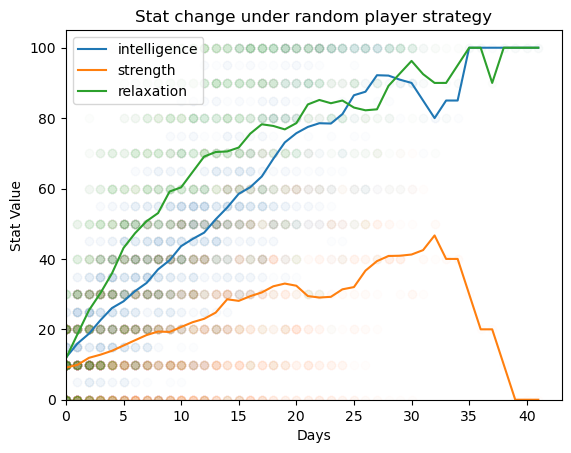
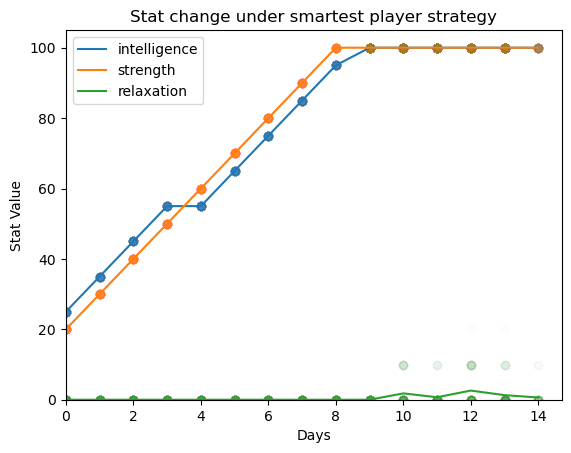
<?xml version="1.0" encoding="utf-8"?><feed xmlns="http://www.w3.org/2005/Atom"><generator uri="https://jekyllrb.com/" version="4.4.1">Jekyll</generator><link href="https://hamaonoverdrive.online/feed/by_tag/code_releases.xml" rel="self" type="application/atom+xml"/><link href="https://hamaonoverdrive.online/" rel="alternate" type="text/html"/><updated>2026-10-31T10:41:55+00:00</updated><id>https://hamaonoverdrive.online/feed/by_tag/code_releases.xml</id><title type="html">hamaonoverdrive.online://</title><subtitle>hamaonoverdrive&apos;s personal website: indie visual novel development and discussion; technology and society; programming and art. The future is in our hands.</subtitle><entry><title type="html">20260102_DSE_Roguelike_V5_Release</title><link href="https://hamaonoverdrive.online/2026/01/02/DSE-Roguelike-V5-release.html" rel="alternate" type="text/html" title="20260102_DSE_Roguelike_V5_Release"/><published>2026-01-02T00:00:00+00:00</published><updated>2026-01-02T00:00:00+00:00</updated><id>https://hamaonoverdrive.online/2026/01/02/DSE-Roguelike-V5-release</id><content type="html" xml:base="https://hamaonoverdrive.online/2026/01/02/DSE-Roguelike-V5-release.html"><![CDATA[<p>Just on time, I’ve completed my listed set of goals for developing the <a href="https://github.com/hamaonoverdrive/dse">roguelike fork of the renpy Dating Sim Engine</a>. The biggest and most impressive feature of this fork is a standalone python simulator for DSE playthroughs, which can be used to estimate typical player stats under different play strategies or estimate gameplay stats like how hard specific endings are to achieve.</p> <div class="image center"> <table> <tr> <td class="relative"> <div class="zoomicon"><i class="fa-solid fa-magnifying-glass-plus"></i></div> <a href="https://hamaonoverdrive.online/imgs/blog/20260102random.png" class="glightbox" data-glightbox="title: ;description: .monte;"> <img src="https://hamaonoverdrive.online/imgs/blog/20260102random.png"/> </a> </td><td class="relative"> <div class="zoomicon"><i class="fa-solid fa-magnifying-glass-plus"></i></div> <a href="https://hamaonoverdrive.online/imgs/blog/20260102smart.png" class="glightbox" data-glightbox="title: ;description: .monte;"> <img src="https://hamaonoverdrive.online/imgs/blog/20260102smart.png"/> </a> </td> </tr></table> <div class="glightbox-desc monte"> Random act selection (left) achieves the "relaxed" ending &gt;90% of the time, while a player who tries to maximize their strength and intelligence stats and prioritizes triggering events (right) always achieves one of the three confession endings.<br/>Running a Monte Carlo Simulation of a simulation game… Baudrillard probably has something to say about this. </div> Random act selection (left) achieves the "relaxed" ending &gt;90% of the time, while a player who tries to maximize their strength and intelligence stats and prioritizes triggering events (right) always achieves one of the three confession endings.<br/>Running a Monte Carlo Simulation of a simulation game… Baudrillard probably has something to say about this. </div> <p>There are already two parties interested in developing games using this engine (and the accompanying suite of simulation tools), and, while it may take the back burner to any game jams I’m involved in, I fully intend to provide support for this engine in the coming years. Don’t hesitate reach out if you want help using this code to make a game! </p> <p>I confess that parts of this code are a bit scrappy because I didn’t want to take the time to rewrite significant chunks of the original engine– renpy treats all variables that aren’t scoped to a method or function as global, and it’s not considered bad form to look at these global variables in scoped code. So some of my rewrites to convert renpy code to python code make dodgy use of the <code class="language-plaintext highlighter-rouge">global</code> keyword. I may or may not come back and clean that up in the future.</p> <p>At some point in the next few months I intend to write a PR for the base DSE engine that includes some of the more generic improvements that I implemented, so do look forward to that if you don’t need the full suite of simulation tools.</p> <p>As for the rest of the changes from the base DSE engine, I’ll just transpose the contents of <code class="language-plaintext highlighter-rouge">README.md</code> here:</p> <h2 id="dse-rougelike-fork">dse: Rougelike Fork</h2> <p>Dating Sim Engine for Ren’Py The Dating Sim Engine (DSE) is a framework for writing games based on events that are triggered by statistics. It comprises a number of independent modules that can be combined to create games.</p> <h3 id="features-of-this-fork">Features of this fork</h3> <ul> <li>Core renpy files updated to modern versions.</li> <li>Additional “Relationship status” screen that displays scores with love interests.</li> <li>Optional “Hardcore” mode, which disables saves and stores all user data in persistent variables.</li> <li>Random events for each day are rolled at the start of the day, instead of right before they occur.</li> <li>Because events for a day are pre-determined, “hintable” events will be highlighted on the scheduler.</li> <li>An event viewer menu, which allows the player to revisit any scene that they have already seen. <strong>Note: This uses the renpy replay function and may lead to undesired behavior if contents of events are conditioned on player stats</strong>. There may be a patch to address this in the future.</li> <li>And last, but certainly not least: an included <a href="https://github.com/hamaonoverdrive/dse/blob/master/game/dse-simulator.ipynb">gameplay simulator</a> which can predict player stat values and endings under different play strategies.</li> </ul> <h2 id="minor-site-updates">Minor site updates</h2> <p>This site is now a member of the <a href="https://teethinvitro.neocities.org/webring/linuxring/">*nix</a> and <a href="https://yurievnring.neocities.org/?page=home">yuri EVN</a> webrings! Go check out these awesome sites!</p> <p>I have added a separate <a href="https://hamaonoverdrive.online/now.xml">rss feed</a> for the “now” series of posts. If you sub to both this and the <a href="https://hamaonoverdrive.online/feed.xml">blog rss feed</a> you should be up to date on all the minor updates of this site.</p> <p>While this site is hosted on neocities, the last updated field there isn’t reliable due to the way my comment system works– this site gets “updated” any time that a spam comment gets posted or deleted, which happens roughly on the daily.</p> <h2 id="see-ya-soon">See ya soon!</h2> <p>Expect another post in a day or two~</p>]]></content><author><name></name></author><category term="code_releases"/><category term="gamedev"/><category term="site_update"/><category term="FOSS"/><summary type="html"><![CDATA[Just on time, I’ve completed my listed set of goals for developing the roguelike fork of the renpy Dating Sim Engine. The biggest and most impressive feature of this fork is a standalone python simulator for DSE playthroughs, which can be used to estimate typical player stats under different play strategies or estimate gameplay stats like how hard specific endings are to achieve. Random act selection (left) achieves the "relaxed" ending &gt;90% of the time, while a player who tries to maximize their strength and intelligence stats and prioritizes triggering events (right) always achieves one of the three confession endings.Running a Monte Carlo Simulation of a simulation game… Baudrillard probably has something to say about this. Random act selection (left) achieves the "relaxed" ending &gt;90% of the time, while a player who tries to maximize their strength and intelligence stats and prioritizes triggering events (right) always achieves one of the three confession endings.Running a Monte Carlo Simulation of a simulation game… Baudrillard probably has something to say about this. There are already two parties interested in developing games using this engine (and the accompanying suite of simulation tools), and, while it may take the back burner to any game jams I’m involved in, I fully intend to provide support for this engine in the coming years. Don’t hesitate reach out if you want help using this code to make a game!]]></summary></entry><entry><title type="html">20251214_Jekyll_Image_Gallery_release</title><link href="https://hamaonoverdrive.online/2025/12/14/Jekyll-Image-Gallery-release.html" rel="alternate" type="text/html" title="20251214_Jekyll_Image_Gallery_release"/><published>2025-12-14T00:00:00+00:00</published><updated>2025-12-14T00:00:00+00:00</updated><id>https://hamaonoverdrive.online/2025/12/14/Jekyll-Image-Gallery-release</id><content type="html" xml:base="https://hamaonoverdrive.online/2025/12/14/Jekyll-Image-Gallery-release.html"><![CDATA[<p>I have just <a href="https://github.com/hamaonoverdrive/Jekyll-Image-Gallery">published a release</a> of my custom and filterable <a href="/gallery">image gallery</a>!</p> <p>Key features:</p> <ul> <li><strong>Automatic thumbnail generation and integrated lightbox</strong>: give users a high-level glance of your work with low-bandwidth images, with high-res versions a single click away.</li> <li><strong>Robust tagging and filtering system</strong>: user-definable and hierarchical tags make it easy for users to find the works they want to see or for you to link users to a specific subset of your works.</li> <li><strong>All gallery information stored in a single file, which can be updated through a bundled python script</strong>: no pesky copy and pasting of image locations and descriptions!</li> <li><strong>Direct link to individual images in gallery view</strong>: avoid hotlinking raw images and preserve the bundled description for a given piece. </li> </ul> <p>Making this was both a stretch of my web dev skills and a way to reach into Jekyll and learn more about what it can do. While I have a much better grasp of how to work with liquid and ruby now, some of the internal workings of this are a bit.. hack-y.</p> <p>I designed this gallery to be modular and easy to update, but I didn’t exactly prioritize portability or ease of installation– even if it takes some effort to get running, hopefully this project can still be of use.</p> <blockquote class="infobox"> <p><strong>Aside on background knowledge</strong>: I wrote this guide assuming that the user has a baseline familiarity with navigating a command line interface, but I recognize that many readers of my blog may not have this.</p> <p>I have a brief cliffnotes guide on this very topic <a href="/writing/BashForBeginners.pdf">here</a>; the two things that you <em>need</em> to know for this are that <u>cd</u> can be used to change directories– when I say “inside <code class="language-plaintext highlighter-rouge">x</code> directory”, I mean that you need to <u>cd</u> to be inside it– and that <code class="language-plaintext highlighter-rouge">control + c</code> can end a currently running command</p> </blockquote> <h2 id="prerequisites">Prerequisites</h2> <p>The following software must be installed:</p> <ul> <li><a href="https://www.python.org/downloads/">Python</a></li> <li><a href="https://jekyllrb.com/docs/installation/">Jekyll</a></li> <li><a href="https://imagemagick.org/script/download.php">ImageMagick</a></li> </ul> <blockquote class="infobox"> <p><strong>Note for Windows users</strong>: While it is possible to install all of these tools under windows, I highly recommend installing <strong><a href="https://learn.microsoft.com/en-us/windows/wsl/install">WSL</a></strong> and running JIG there instead.</p> </blockquote> <h2 id="step-1-get-the-demo-online">Step 1: Get the demo online</h2> <p>Bundled with the gallery is a demo that you can use to make sure that Jekyll is set up properly. You can see an example of what the demo should look like <a href="/demo/gallery/">here</a>.</p> <ol> <li>Download the latest version of JIG from the <a href="https://github.com/hamaonoverdrive/Jekyll-Image-Gallery/releases">releases page</a>.</li> <li>Create a new Jekyll site with <div class="language-plaintext highlighter-rouge"><div class="highlight"><pre class="highlight"><code>jekyll new mysitename
</code></pre></div> </div> </li> <li>Extract the contents of the <code class="language-plaintext highlighter-rouge">JIGv*.zip</code> into the <code class="language-plaintext highlighter-rouge">mysitename</code> directory.</li> </ol> <blockquote class="infobox"> <p>If there are any warnings about files with the same name, overwrite the ones in the Jekyll directory with the ones from the JIG folder.</p> </blockquote> <ol start="4"> <li>From inside the <code class="language-plaintext highlighter-rouge">mysitename</code> directory, run the following command to build and serve the webpage locally. <div class="language-plaintext highlighter-rouge"><div class="highlight"><pre class="highlight"><code>bundle exec jekyll serve
</code></pre></div> </div> </li> </ol> <blockquote class="infobox"> <p>This may take a few minutes the first time you run it because thumbnail generation is happening in the background. As long as there are no error messages, this is fine.</p> </blockquote> <ol start="5"> <li>Open your web browser and navigate to <a href="http://localhost:4000">http://localhost:4000</a>.</li> </ol> <h4 class="no_toc" id="voila-the-demo-should-be-running-on-your-local-machine">Voila! The demo should be running on your local machine.</h4> <h2 id="step-2-populate-the-gallery-with-your-own-images">Step 2: Populate the gallery with your own images</h2> <p>The gallery expects all images to be stored in <code class="language-plaintext highlighter-rouge">/imgs/gallery/</code> and stores a file with information about all of these at <code class="language-plaintext highlighter-rouge">_data/gallery.yml</code>. The script <code class="language-plaintext highlighter-rouge">generateGallery.py</code> can automatically update the yml file based on the contents of the image directory.</p> <ol> <li>Delete all image files currently inside of <code class="language-plaintext highlighter-rouge">/imgs/gallery/</code>.</li> <li>Copy your image files into <code class="language-plaintext highlighter-rouge">/imgs/gallery/</code>.</li> </ol> <blockquote class="infobox"> <p>JIG will try to sort images based on image names. The heading that each image is placed under is decided by the filename up to the first underscore (<code class="language-plaintext highlighter-rouge">_</code>). <strong>All image filenames must have an underscore for the script to work.</strong></p> </blockquote> <ol start="3"> <li>Edit <code class="language-plaintext highlighter-rouge">_data/gallery.yml</code> and remove everything under the <code class="language-plaintext highlighter-rouge">images</code> heading.</li> <li>Remove the contents of the <code class="language-plaintext highlighter-rouge">tags</code> section and add your own tag structure. <ul> <li>You can have as many tag groups as you like, but remember that every gallery item will need to be tagged with at least one item from each root group.</li> <li>Gallery items may be tagged with multiple tags from any group.</li> <li>Hierarchical tags can only go 3 layers deep.</li> </ul> </li> <li>Inside the directory for your project, run <code class="language-plaintext highlighter-rouge">python generateGallery.py -i</code> and follow the prompts to describe and tag your images.</li> <li>Run <code class="language-plaintext highlighter-rouge">bundle exec jekyll serve</code> and check your local browser to make sure that the gallery appears as expected.</li> <li>To export the gallery to your website, run <code class="language-plaintext highlighter-rouge">bundle exec jekyll build</code> and copy the contents of the <code class="language-plaintext highlighter-rouge">_site</code> folder to your web host.</li> </ol> <h3 id="step-25-update-the-gallery-with-more-images">Step 2.5: Update the gallery with more images</h3> <p>This project was designed to make this step as simple as possible after the initial setup.</p> <ol> <li>Copy all new image files to <code class="language-plaintext highlighter-rouge">/imgs/gallery/</code>.</li> <li>From the project directory, run <code class="language-plaintext highlighter-rouge">python generateGallery.py -i</code> and follow the prompts.</li> <li>Run <code class="language-plaintext highlighter-rouge">bundle exec jekyll build</code> and copy the new contents of the <code class="language-plaintext highlighter-rouge">_site</code> folder to your web host.</li> </ol> <h2 id="step-3-optional-integrate-the-gallery-with-the-rest-of-your-jekyll-site">Step 3 (optional): Integrate the gallery with the rest of your Jekyll site</h2> <p>This step is a little involved because JIG leverages many features of Jekyll, all of which need to be integrated for the gallery to work.</p> <ol> <li>Copy the following paths from JIG into your project directory:</li> </ol> <div class="language-plaintext highlighter-rouge"><div class="highlight"><pre class="highlight"><code>/assets/*
/imgs/gallery/
/_includes/image.html
/_layouts/gallery.html
/_plugins/jekyll-responsive-magick.rb
</code></pre></div></div> <p>If there are any collisions, they will have to be refactored.</p> <ol start="2"> <li>Modify your <code class="language-plaintext highlighter-rouge">_layouts/default.html</code> file and include the following in your <code class="language-plaintext highlighter-rouge">&lt;head&gt;</code> tag:</li> </ol> <div class="language-plaintext highlighter-rouge"><div class="highlight"><pre class="highlight"><code>{% if page.layout == 'gallery' %}
&lt;link href="assets/glightbox.min.css" rel="stylesheet" type="text/css" /&gt;
&lt;link href="assets/gallery.css" rel="stylesheet" type="text/css" /&gt;
&lt;script src="assets/glightbox.min.js"&gt;&lt;/script&gt;
&lt;script src="assets/gallery.js"&gt;&lt;/script&gt;
{% endif %}
</code></pre></div></div> <p>From here, go to step 2.2 to finish setting up the gallery.</p> <h2 id="step-4-optional-gallery-configuration-settings">Step 4 (optional): Gallery configuration settings</h2> <h4 id="how-to-specify-image-tags-via-url">How to specify image tags via URL</h4> <p>Example: <a href="/demo/gallery/?category=photograph&amp;photograph=animal,mineral&amp;warnings=no-warning-needed"><code class="language-plaintext highlighter-rouge">?category=photograph&amp;photograph=animal,mineral&amp;warnings=no-warning-needed</code></a></p> <ul> <li>add a <code class="language-plaintext highlighter-rouge">?</code> to the end of the URL and list each tag group and selected tags after that, separated by a <code class="language-plaintext highlighter-rouge">&amp;</code></li> <li>both tags and groups are lowercase and “slugified”, ie all spaces are replaced with <code class="language-plaintext highlighter-rouge">-</code> and all punctuation is removed</li> <li>when specifying multiple tags in the same group, separate them with a comma</li> <li>when specifying a nested tag, all tags that are above it in the hierarchy must be defined as well</li> </ul> <h4 id="default-view">Default view</h4> <p>In <code class="language-plaintext highlighter-rouge">_data/gallery.yml</code>, the default groups on page load can be specified by adding a <code class="language-plaintext highlighter-rouge">default</code> group with tag groups inside it, formatted the same way that they are in the tags section. Items that do not have these tags will be hidden by default.</p> <p>For example, the following will hide all items tagged with “arachnophobia” from the demo gallery:</p> <div class="language-plaintext highlighter-rouge"><div class="highlight"><pre class="highlight"><code>default:
  Warnings:
    - No warning needed
</code></pre></div></div> <h4 id="thumbnail-size-and-quality">Thumbnail size and quality</h4> <p>Some settings for how ImageMagick creates thumbnails can be defined in your <code class="language-plaintext highlighter-rouge">_config.yml</code> file. The default settings are as follows:</p> <div class="language-plaintext highlighter-rouge"><div class="highlight"><pre class="highlight"><code>responsive:
  pixels: 22500  # approximate number of pixels in each thumbnail
  quality: 30    # image compression quality
</code></pre></div></div> <h2 id="in-closing">In Closing</h2> <p>Please let me know if you experience any bugs or errors while using this tool. Some aspects of JIG are a little rough around the edges, but I believe that this gallery <em>should</em> work for most users.</p> <p>Because I have released JIG under the MIT Licence no attribution is required, but I would appreciate a link back if you did use this software on your website. And let me know about it! :)</p>]]></content><author><name></name></author><category term="FOSS"/><category term="code_releases"/><summary type="html"><![CDATA[I have just published a release of my custom and filterable image gallery! Key features: Automatic thumbnail generation and integrated lightbox: give users a high-level glance of your work with low-bandwidth images, with high-res versions a single click away. Robust tagging and filtering system: user-definable and hierarchical tags make it easy for users to find the works they want to see or for you to link users to a specific subset of your works. All gallery information stored in a single file, which can be updated through a bundled python script: no pesky copy and pasting of image locations and descriptions! Direct link to individual images in gallery view: avoid hotlinking raw images and preserve the bundled description for a given piece.]]></summary></entry></feed>